Review Comments (0) Screenshots (8) Questions & Answers (0) Votes (8) Awards (8) Wiki  
(8)
4Media
6.8.0.1101
www.mp4converter.net
Shareware
$29.99  Purchase
1 898 people
Download 4Media MP4 to MP3...

33.62 MBDownloaded 827 times

This software was checked for viruses 2 months ago and was found to contain no viruses.
Click here to see antivirus report.
 

Review

This is official description

With this program, you can extract MP3 from MP4, MPEG-1, MPEG-2, MPEG-4, WMV, AVI, 3GPP, 3G2, MOV, RM, RMVB, DV, H.264/AVC video files and convert MP3 from various audios: WAV, WMA, AAC, AC3, AIFF, AIF, CDA, FLAC, MPA and M4A. It works on Microsoft Windows XP (SP2 or later), Windows Vista, Windows 7.
 
The following review written by one of the Software Informer contributors applies to version 5.1

4Media MP4 to MP3 Converter can help you to convert all your videos to MP3 audio files in minutes. The program is one of the best video to audio converters I have ever used. Don’t go on its name, it cannot only convert MP4 videos, but also all the video formats including VOB, MPEG, DAT, 3GP and FLV.

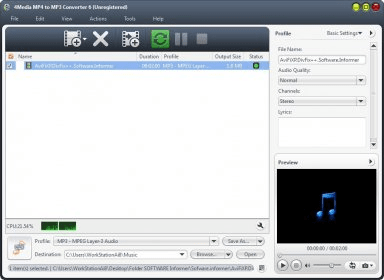
The converter has a video player that enables you to preview your videos before conversion. It also supports multiple files conversions. So it does not matter how many videos are added to the conversion list and of which video format your files are. You will get the result after the conversion in MP3 format only.

The user interface is really cool and easy. The converter supports four skins and auto shutdown feature that can turn off or hibernate your PC automatically after your conversion is complete. It can also split your resulting MP3 files by time or by size. I feel that this feature is useless while converting videos to audio. But it can be used to make ringtones for your phone from a video. This is the first video converter I have seen which shows the CPU usage. You can also limit the memory usage by this converter to save enough RAM for other applications. You can customize the audio channels and audio quality of resulting audio files using very simple settings. Additionally, a built-in ID3 tag editor is given that will help you to manage your audio.

Shortly, the program is one of the best video to audio converters available and must be given a trial.
  • Easy to use.
  • Support for multiple skins.
  • Built-in audio splitter.
  • None.

Reviewed by: Jasminder Singh

Reviewer rating:

Reviewed: 2 years ago

What's new in version 6.8

Newly added skin for Christmas;
Common-use and advanced settings for profiles are offered to meet different customers' needs;
Customizing the output file size with a Bitrate Calculator tool is available now;
Set various profiles from the same source file for outputting to facilitate your conversion;
Support running the program in the background for your convenience.

What's new in version 6.5

- Newly added skin for Christmas;
- Common-use and advanced settings for profiles are offered to meet different customers' needs;
- Customizing the output file size with a Bitrate Calculator tool is available now;
- Set various profiles from the same source file for outputting to facilitate your conversion;
- Support running the program in the background for your convenience.

What's new in version 5.1

Newly added iPod touch profile for input videos.
Report a wrong version Report a wrong program title Suggest a correction

Screenshots

Main Window Main Window Main window Main window Version details Version details Output profile settings Output profile settings
All 8 screenshots

Latest comments


There are no comments, be the first one!
Add new comment

E-mail Address:

Password:

Register now »

Forgot password?

Sign in with:
Download Software Informer Client
Copyright © 2012, Informer Technologies, Inc. About| Privacy and terms| Help| Feedback & Support| Partners program